
Capture travel expenses, receipts, kilometres and allowances digitally and pass them on to your accounting as business expenses, without Excel or piles of paper. With the Spesenfuchs travel expense software, the self-employed and freelancers handle their travel expense reports digitally: from recording the business trip and the receipts, through meal and mileage allowances, to passing everything on to accounting or your tax advisor. You capture receipts with your smartphone, and the AI reads them automatically. Statutory allowances and exchange rates are taken into account in the report. 30 days free · No credit card required · The trial ends automatically As a self-employed person, nobody reimburses your travel expenses. You claim them as business expenses in your accounts or cash-basis income statement (EÜR). Most rules are the same as for employees, but there are differences in some points: So that Spesenfuchs calculates correctly, set “self-employed” in the user settings on the account assignment tab. An overnight allowance can then no longer be selected. Meals provided also reduce the per diem for the self-employed, for example a breakfast included in the hotel bill. How to book entertainment is explained in the guide Post entertainment receipts correctly, the current rates in Per diems 2026. A travel expense report is more than collecting receipts. Travel costs, per diems, overnight stays, trips abroad and different currencies must be recorded correctly and then prepared for accounting. Spesenfuchs guides you through the report step by step. The necessary calculations are made automatically based on your entries and the stored allowances. This turns the recorded data into a complete travel expense report, without Excel lists or manual calculations. With the Spesenfuchs app, you photograph receipts directly on the go. The receipts land automatically in the receipt inbox and are available there for further processing. The integrated AI receipt recognition reads important information from the receipt automatically. This reduces manual data entry.Travel expense software for the self-employed and freelancers
How the self-employed settle travel expenses differently
Topic
Employees
Self-employed
Settlement
Employer reimburses tax-free
Business expense in the accounts
Meals
Allowances €14 and €28 (Germany)
the same allowances
Overnight stay
Allowance €20 or hotel receipt
only the actual costs as per receipt
Travel costs private car
€0.30 per km
€0.30 per km
Company car
Costs borne by the employer
actual costs in the business
Entertainment
70% deductible
70% deductible
Travel expense reports without Excel or piles of paper
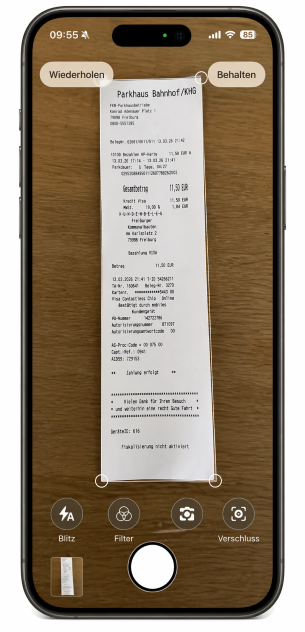
Capture receipts easily with your smartphone
Pass travel expenses directly to accounting
Your travel expenses go as booking data with receipts to wherever you keep your accounts: to your accounting software or your tax advisor. Depending on the interface, booking data and receipts are transferred directly or provided as export files. This saves manual data entry.
- Lexware Office, sevdesk, BuchhaltungsButler, Kontolino! and weclapp
- DATEV Buchungsdatenservice and DATEV Rechnungsdatenservice 1.0
- DATEV export files for financial accounting
- Travel expense report and receipt list as PDF
You will find all connections under Integrations.

Calculate travel expenses correctly and automatically
- Per diems: calculated automatically for domestic and international trips based on length and destination.
- Mileage allowances: record kilometres driven with your private vehicle, and the travel costs are calculated.
- Trips abroad and currencies: expenses in other currencies are taken into account with the appropriate exchange rate.
- No input tax deduction: settle travel expenses without input tax deduction too, for example as a small business under § 19 UStG.
Who is Spesenfuchs suitable for?
The self-employed and freelancers settle their own travel expenses with the PRO version: record trips, receipts, kilometres and allowances and prepare them for accounting. PRO costs €6 per month or €38 per year (plus VAT).
Companies and teams use the TEAM version: employees submit their travel expenses, managers and accounting check, approve and pass them on. More under Travel expenses in a team and on the Prices page.
Frequently asked questions about the travel expense software
What is travel expense software?
Travel expense software supports the digital recording and settlement of business trips. Travel expenses such as travel costs, per diems, overnight stays and receipts are recorded centrally, calculated and then provided for accounting.
Can the self-employed claim per diems?
Yes. The self-employed claim the same per diems as employees, €14 and €28 in Germany and the rates of the respective country abroad. They are business expenses.
Is there an overnight allowance for the self-employed?
No. The self-employed claim overnight stays only at the actual costs as per receipt. In Spesenfuchs, you set in the user settings on the account assignment tab that you are self-employed. An overnight allowance can then not be selected, and you record the hotel receipt.
Who is Spesenfuchs suitable for?
Spesenfuchs is suitable for the self-employed and for companies that want to settle travel expenses digitally. Companies can also involve employees in the process and check, approve and pass on travel expenses to accounting.
Can receipts be captured with a smartphone?
Yes. With the Spesenfuchs app, receipts can be photographed directly with your smartphone and transferred to Spesenfuchs. The integrated AI receipt recognition can read relevant receipt data automatically.
Does Spesenfuchs calculate per diems and mileage allowances automatically?
Yes. Spesenfuchs calculates per diems based on the recorded trip data and the stored allowances. Kilometres driven with a private vehicle can also be recorded, and the corresponding travel costs are calculated.
Does Spesenfuchs support trips abroad and foreign currencies?
Yes. The allowances stored for the respective destination country and expenses in different currencies are taken into account.
Can travel expenses be transferred to DATEV?
Yes. Spesenfuchs supports DATEV Buchungsdatenservice, DATEV Rechnungsdatenservice 1.0 and DATEV export files for financial accounting. Depending on the method, booking data and receipts are transferred directly or provided as export files.
Which other accounting systems does Spesenfuchs support?
In addition to DATEV, Lexware Office, sevdesk, BuchhaltungsButler, Kontolino! and weclapp, among others.
Can Spesenfuchs be used without input tax deduction?
Yes. This is relevant, for example, for small businesses under § 19 UStG and other companies that are not entitled to deduct input tax.
Can several employees use Spesenfuchs?
Yes, with the TEAM version. Employees record and submit their travel expenses, managers and accounting check, approve and process them further.
Can I try Spesenfuchs for free?
Yes. Spesenfuchs can be tested free of charge for 30 days without a credit card. The trial ends automatically, you do not have to cancel anything.
More guides: Create a travel expense report, Distance allowance and mileage allowance.
Related features for the self-employed
All features at a glanceCompare PRO and TEAM in detailIntegrations